
HTML Layout
Semantic HTML5 structure: header, main, article, aside, footer, nav, section.
Overview diagram
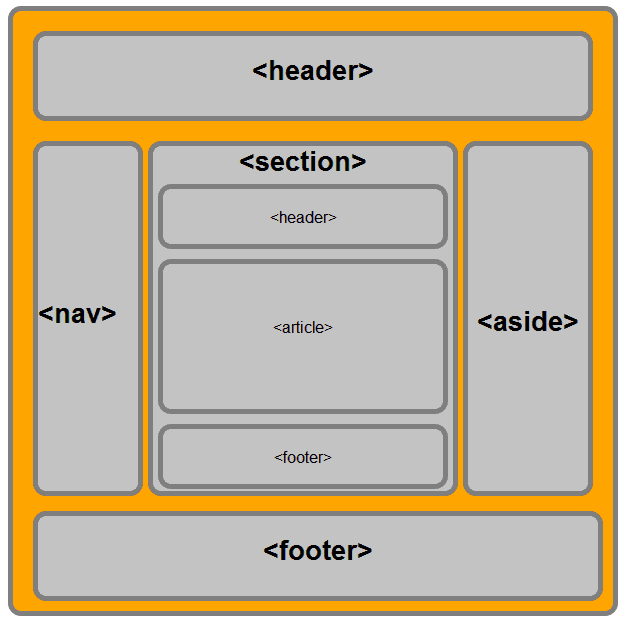
| Tag | Description |
|---|---|
<header> | Header of the document or a section |
<nav> | Container for navigation links |
<section> | A section of content within the document |
<article> | A self-contained, reusable piece of content |
<aside> | Side content (sidebar, ads) |
<footer> | Footer of the page or a section |
<details> | Collapsible block revealing extra detail |
<summary> | Heading for the <details> element |
Standard skeleton
html<!DOCTYPE html>
<html lang="vi">
  <head>
    <meta charset="UTF-8" />
    <meta name="viewport" content="width=device-width, initial-scale=1" />
    <title>Trang chủ</title>
  </head>
  <body>
    <header>...</header>
    <nav>...</nav>
    <main>
      <article>
        <section>...</section>
      </article>
      <aside>...</aside>
    </main>
    <footer>...</footer>
  </body>
</html>
When to use which tag?
<header>— top of page or section (logo, title).<nav>— main navigation links block.<main>— main content — only one per page.<article>— standalone block (post, comment, product card).<section>— group of related content with a heading.<aside>— secondary content (sidebar, ads).<footer>— footer of page or section.
Heading hierarchy
Each page should have exactly one <h1>; following headings step down (h2 → h3 → h4) — never skip levels. Good for SEO and screen readers.
✅Don’t use headings for styling — use CSS. Use headings for structural meaning.
Accessibility quick wins
- Every <img> has alt. Decorative images use alt="".
- Form inputs have <label for="...">.
- A real button is <button>, not <div onClick>.
- Use aria-label for icon-only buttons.